

Arabic Website Accessibility
Common Barriers and How to Test Them
A practical guide for government and enterprise teams managing Arabic and bilingual websites
Audits and Testing
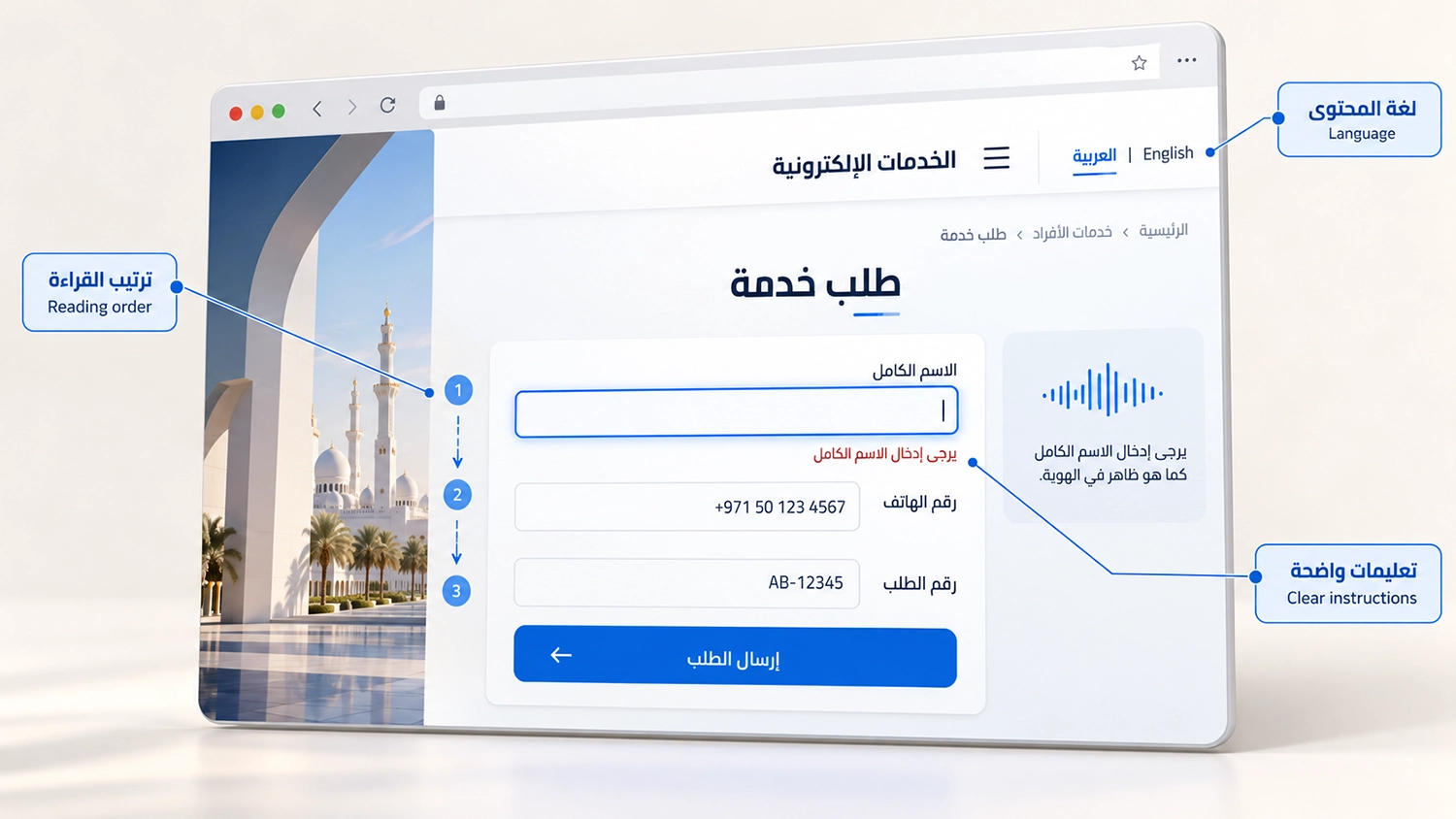
Arabic website accessibility depends on whether people can understand content, navigate controls and complete services in Arabic. Translating an English website and aligning its text to the right does not establish that outcome. Language settings, reading order, forms and mixed-language information need their own evaluation.
For government entities and businesses across the GCC, this matters wherever visitors apply for services, book appointments, submit documents or make payments. A barrier in the Arabic journey can prevent someone from completing the same task that works in English. This guide explains what to test and how to connect the findings to improvements. The examples are illustrative, rather than claims about particular client projects.
Why Arabic Website Accessibility Needs Separate Testing
Two language versions may share templates but behave differently. Arabic labels can take more space, a translated error may lose an essential instruction, and a third-party payment page may return visitors to an English-only interface. These differences can affect both usability and accessibility.
The relevant WCAG requirements apply across languages. However, assessing them requires attention to the actual Arabic content and interaction. An English test result should not be treated as evidence that the Arabic version also conforms. Our guide to automated and manual accessibility testing explains why software checks need contextual review.
Language Settings and Screen Reader Pronunciation
A screen reader needs language information to select appropriate pronunciation rules where the software and installed voices support them. Check that the page declares Arabic and that passages in another language are identified where required. Language and direction are separate properties: declaring Arabic does not, by itself, set the layout direction.
W3C guidance on language changes explains the requirement and its exceptions, including proper names and certain technical terms. Not every English brand name needs separate markup. Pronunciation also varies between speech engines, so an unusual spoken result alone does not establish a coding failure.
For example, an Arabic service page may include an English eligibility instruction. Review its language markup and listen to the passage with the agreed screen reader and browser. Check headings, links and control names too, recording the voice, language settings and environment used. A read-aloud feature is useful for some visitors, but it is not a substitute for testing screen-reader navigation and interaction.
Right to Left Layout and Meaningful Reading Order
Visual alignment does not determine the order in which assistive technology receives content. A layout can appear correct while its underlying sequence places an instruction after the field it explains or separates a heading from its section.
Evaluate the Arabic page in its meaningful reading sequence, including menus, cards, service steps and dialogs. W3C guidance on right-to-left HTML describes structural direction settings, while Meaningful Sequence explains when reading order must preserve meaning.
A three-step application process should remain understandable when read without relying on its visual position. Avoid assuming that every element must be reversed. Numbers, media controls and independent content groups need decisions based on their meaning and expected behaviour.
Keyboard Navigation in Arabic Interfaces
Use the keyboard to open menus, select options, enter information, dismiss dialogs and complete the service. Focus must remain visible and move in an order that preserves meaning and operation. It should not jump between unrelated sections because a template was visually mirrored.
Under WCAG Focus Order, more than one logical sequence may be acceptable. The aim is understandable navigation, rather than mechanically forcing every control into a right-to-left sequence. Test custom controls using their documented keyboard behaviour and check what happens when a dialog opens and closes.
Mixed Arabic and English Content
Phone numbers, email addresses, reference codes and currency values often appear inside Arabic sentences. Poor handling of bidirectional text can move punctuation or reorder parts of a value, making it harder to read or copy accurately.
Test realistic values in labels, input fields, summaries and confirmation messages. A reference such as AB-12345 should remain understandable when displayed, copied and announced. Check country codes, decimal values and dates, and use appropriate direction handling for embedded content. Do not judge success from a screenshot alone: selection, copying and assistive technology may reveal different problems.
Arabic Forms and Error Messages
Arabic forms need clear labels and instructions, meaningful control names and useful validation feedback. A translated placeholder alone does not provide a durable visible label, since it can disappear as someone types.
Review required fields, accepted formats, upload limits and recovery instructions against W3C guidance on labels and instructions. Then submit incomplete or invalid information and check whether users can identify the affected field, understand the problem and correct it.
For example, a generic message meaning “Invalid input” does little to explain an incorrectly entered date. A useful Arabic instruction states the required format and stays associated with the field. Also test whether error and success messages are exposed to assistive technology, and whether entering Arabic names or supported numeral forms produces the intended result.
Arabic Text at Zoom and on Smaller Screens
Test Arabic content when visitors enlarge text, zoom the page or use a narrow viewport. Watch for clipped letters, overlapping labels, hidden buttons and fixed-height containers that cut off instructions. Select fonts that remain legible at the sizes used in the interface.
WCAG Reflow addresses retaining content and functionality without requiring scrolling in two dimensions at the specified size, with exceptions for content that needs a two-dimensional layout. Its practical checks should include Arabic menus, forms and service summaries.
Also review applicable text-spacing adjustments. The criterion accounts for languages and scripts that do not use every listed spacing property. Apply the relevant conditions and check for loss of content or functionality, rather than imposing unsuitable spacing on Arabic letter connections.
Testing Arabic Website Accessibility Across the Service Journey
Start from an Arabic landing page and complete a realistic task through confirmation. Include authentication, verification codes, file uploads and third-party services within the agreed scope. Switching language should be checked at meaningful points, including whether visitors lose information or encounter untranslated instructions.
Arabic PDFs, captions and downloadable forms also need appropriate evaluation. An accessible page does not resolve a barrier in a document required to finish the service. Record language, page state, browser, device and assistive technology alongside each finding so the development team can reproduce it.
Where Accessibility Widgets Fit
An accessibility widget can give visitors options for presentation and reading support. VisiWidget provides Arabic and English interfaces, preset accessibility profiles, text and contrast controls, and read-aloud options at normal, slow or fast speed.
These features can support personalisation. They do not, by themselves, establish that Arabic labels, reading order, error handling or complete transactions meet WCAG. Evaluate VisiWidget alongside the underlying website and test relevant settings with realistic content. Visitors should be able to choose the options useful to them rather than being assumed to share one set of needs.
A Practical Testing Plan for Your Team
Start your Arabic website accessibility testing with the services most important to your audience. Agree the WCAG version and level, language versions, representative pages, critical journeys and supported test environments. Run automated checks to identify selected technical issues, then review Arabic meaning, direction, keyboard behaviour and assistive technology output manually.
Document each confirmed barrier with its location, user impact, reproduction steps, relevant requirement and recommended correction. Prioritise issues that block essential tasks and recurring problems in shared components. After remediation, retest the affected Arabic journey and check the English version for regressions.
Frequently Asked Questions
Does a right to left layout make an Arabic website accessible
No. Direction is one part of the implementation. Meaningful structure, keyboard operation, labels, language information and complete service journeys also need evaluation.
Can an automated checker assess Arabic content
It can assess selected technical conditions on Arabic pages, depending on its rules and scope. It cannot establish whether all instructions are understandable or every Arabic journey works. Manual Arabic review remains necessary.
Is translation enough if the English website passed an audit
No. Translation and localisation can introduce different barriers. The Arabic version needs evidence from its own content, states and journeys within the agreed audit scope.
Does an Arabic read aloud feature replace screen reader testing
No. Reading text aloud is different from exposing headings, control names, states, errors and navigation to a screen reader. Both functions should be evaluated for their intended purpose.
How VisiAble Can Help
VisiAble helps government and enterprise teams assess Arabic and bilingual website accessibility through professional audits combining automated checks with manual evaluation. The work can cover Arabic content, right-to-left interfaces, keyboard navigation, assistive technology testing and agreed service journeys, with prioritised recommendations and verification of fixes.
Our approach connects visitor personalisation through VisiWidget with evaluation of the underlying service. Explore our professional accessibility audits and accessibility standards to understand the available scope.
If your organisation provides services in Arabic and English, contact VisiAble to discuss a testing plan based on the journeys your visitors need to complete.